



Introduction of the Project
Guess The Color Game is a fun and interactive game where users have to guess the correct color based on the RGB value displayed. In this Javascript tutorial, we will develop a Guess The Color Game in Javascript.
We will create a method that generates random colors & selects one color from them, which needs to be guessed by the players. Whoever picks the right color first will win the game.
Objectives
1. To create a game board that displays a set of colored squares with random RGB values generated using JavaScript.
2. To allow the user to make a guess by clicking on the square they believe matches the displayed RGB value.
3. To validate the user’s guess and provide feedback on whether the guess is correct or not.
4. To allow the user to play the game multiple times by providing a reset button that generates a new set of colors.
5. To ensure that the game’s user interface is clear and easy to understand, with appropriate labeling and instructions.
6. To design the game so that it is accessible and usable on a range of devices, including desktops, laptops, and mobile devices.
7. To implement a scoring system that tracks the user’s performance and provides feedback on their progress over time.
8. To ensure that the game is robust and able to handle unexpected input and user behavior.
9. To add additional features, such as sound effects or animations, to enhance the game’s user experience and engagement.
Requirements
We have listed down some requirements that can be considered while building a Guess The Color Game in JavaScript:
2. A Basic understanding of syntax and functions in HTML, CSS, and JavaScript
3. User Interface: The game should have a user-friendly interface, including a clear game board, appropriate labels, and instructions on how to play the game.
4. Game Board: The game board should consist of multiple squares of different colors, and each square should display its corresponding RGB value.
5. Random Color Generation: The game should generate a set of random colors for the squares each time the game is played, ensuring that each game is unique.
6. Guessing Mechanism: The user should be able to make a guess by clicking on the square they believe matches the displayed RGB value.
7. Validation Mechanism: The game should validate the user’s guess and provide feedback on whether the guess is correct or not.
8. Reset Button: The game should have a reset button that generates a new set of colors, allowing the user to play the game multiple times.
Source Code
HTML Code
<!DOCTYPE html>

<html>

<head>

<title>Colour Game</title>

<link rel="stylesheet" type="text/css" href="colorgame.css">

<link href="https://fonts.googleapis.com/css2?display=swap&family=Catamaran:wght@300&display=swap" rel="stylesheet">

</head>

<body>

<h1>the great

<br>

<span id="colorDisplay">RGB</span>

<br>

guessing game

</h1>

<div id="stripe">

<button id="reset">New Colors</button>

<span id="message"></span>

<button class="mode">Easy</button>

<button class="mode selected">Hard</button>

</div>

<div id="container">

<div class="square"></div>

<div class="square"></div>

<div class="square"></div>

<div class="square"></div>

<div class="square"></div>

<div class="square"></div>

</div>

<div class="footer">

<p>copyright © 2020</p>

</div>

<script type="text/javascript" src="colorgame.js"></script>

</body>

</html>
CSS Code
body {

background-color: #232323;

margin: auto 0;

font-family: 'Catamaran', sans-serif;

}

.square {

width: 30%;

background-color: purple;

padding-bottom: 30%;

float: left;

margin: 1.66%;

/*border-radius: 15%;*/

/*border-radius: 25% 10%;*/

/*border-radius: 10% 30% 50% 70%;*/

/*border-radius: 10% / 50%*/

/*border-radius: 10px 100px / 120px;*/

border-radius: 50% 20% / 10% 40%;

/*border-radius: 50%;*/

transition: background 0.6s;

}

#colorDisplay {

font-size: 200%;

}

#container {

max-width: 600px;

margin: 20px auto 0 auto;

}

h1 {

color: white;

text-align: center;

background-color: steelblue;

margin: 0;

font-weight: normal;

text-transform: uppercase;

line-height: 1.1;

padding: 20px 0;

}

#stripe {

background-color: white;

height: 30px;

text-align: center;

}

.selected {

background-color: steelblue;

color: white;

}

button {

color: steelblue;

background: none;

border: none;

text-transform: uppercase;

height: 100%;

font-weight: 700;

letter-spacing: 1px;

font-size: inherit;

transition: all 0.3s;

outline: none;

}

button:hover {

color: white;

background-color: steelblue;

}

#message {

display: inline-block;

width: 20%;

}

.footer{

position: absolute;

top: 625px;

bottom: 0;

height: 32px;

width: 100%;

background-color: white;

}

.footer > p {

position: absolute;

top: -10px;

color: steelblue;

font-weight: bold;

margin-left: 45%;

/*text-align: center;*/

/*line-height: 1.8;*/

}

/*Responsive css*/

@media(max-width: 600px){

.footer > p {

margin-left: 40%;

}

}
JAVASCRIPT Code
var numSquares = 6;

var colors = generateRandomColors(numSquares);

var h1 = document.querySelector("h1");

var squares = document.querySelectorAll(".square");

var pickedColor = pickColor();

var colorDisplay = document.getElementById("colorDisplay");

var messageDisplay = document.querySelector("#message");

var resetButton = document.getElementById("reset");

var modeButtons = document.querySelectorAll(".mode");

colorDisplay.textContent = pickedColor;

init();

function init(){

setupModeButton();

setupSquares();

reset();

}

//defining the setupModeButton function

function setupModeButton(){

for (var i = 0; i < modeButtons.length; i++) {

modeButtons[i].addEventListener("click",function(){

modeButtons[0].classList.remove("selected");

modeButtons[1].classList.remove("selected");

this.classList.add("selected");

this.textContent === "Easy" ? numSquares = 3 : numSquares = 6;

reset();

});

}

}

//defining the setupSquares function

function setupSquares(){

//Coloring the squares

for(var i=0;i<colors.length;i++){

//add click listeners to squares

squares[i].addEventListener("click",function(){

//grab color of clicked square

var clickedColor = this.style.backgroundColor;

//compare color to picked color

if(clickedColor === pickedColor){

messageDisplay.textContent = "Correct!!";

resetButton.textContent = "Play Again?";

changeColor(clickedColor);

h1.style.backgroundColor = clickedColor;

}

else{

this.style.backgroundColor = "#232323";

messageDisplay.textContent = "Try Again!!!";

}

});

}

}

//reset button to reset the colors

resetButton.addEventListener("click",function(){

//generate all new colors

colors = generateRandomColors(numSquares);

//pick a new random color from array

pickedColor = pickColor();

//change colorDisplay to match picked color

colorDisplay.textContent = pickedColor;

//

for(var i=0;i<colors.length;i++){

//add colors to squares

squares[i].style.backgroundColor = colors[i];

}

h1.style.backgroundColor = "steelblue";

messageDisplay.textContent = "";

this.textContent = "New Colors";

});

function reset(){

//generate all new colors

colors = generateRandomColors(numSquares);

//pick a new random color from array

pickedColor = pickColor();

//change colorDisplay to match picked color

colorDisplay.textContent = pickedColor;

resetButton.textContent = "New Colors";

messageDisplay.textContent = "";

//change colors of squares

for(var i=0;i<squares.length;i++){

if(colors[i]){

squares[i].style.display = "block";

squares[i].style.backgroundColor = colors[i];

}

else{

squares[i].style.display = "none";

}

}

h1.style.backgroundColor = "steelblue";

}

function changeColor(color){

//loop through all squares

for (var i = 0; i < colors.length; i++) {

squares[i].style.backgroundColor = color;

}

}

function pickColor(){

var random = Math.floor(Math.random() * colors.length);

return colors[random];

}

function generateRandomColors(num){

//make an array

var arr = [];

//add num random colors to array

for(var i=0;i<num;i++){

//get random color and push them into an array

arr.push(randomColor());

}

//return that array

return arr;

}

function randomColor(){

//pick a 'red' from 0 - 255

var r = Math.floor(Math.random() * 256);

//pick a 'green' from 0 - 255

var g = Math.floor(Math.random() * 256);

//pick a 'blue' from 0 - 255

var b = Math.floor(Math.random() * 256);

return "rgb(" + r + ", " + g + ", " + b + ")";

}
Explanation of the Code
1. We initially included multiple <div> tags to denote squares of random colors.
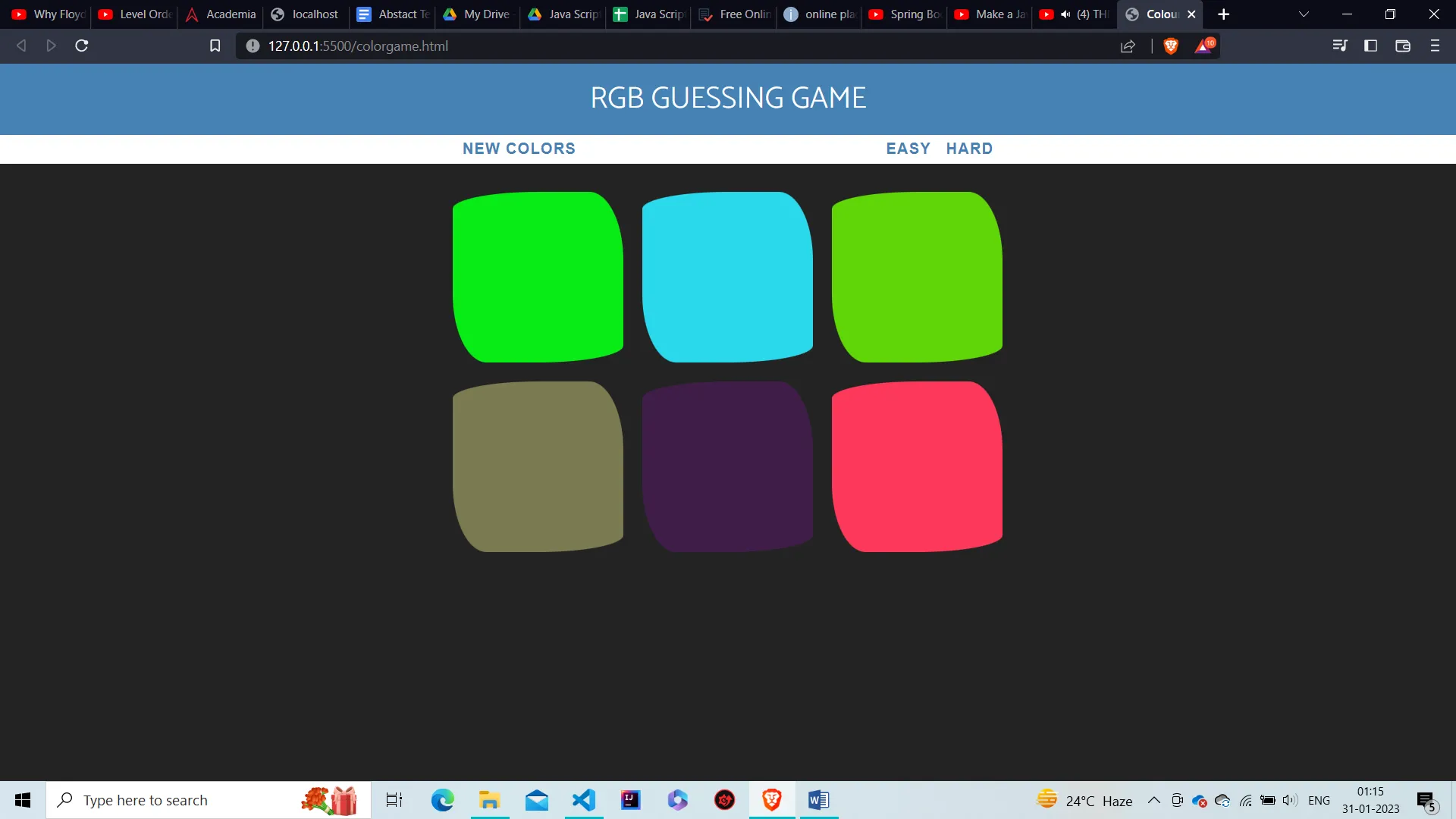
2. We have given 3 buttons “EASY”, “HARD” & “NEW COLORS”.
3. We have styled the HTML with CSS and provided containers with appropriate margins, padding, font color, and font size.
Moving on to choosing the random colors, we have displayed squares based on the mode selected & provides random colors to each using JavaScript. To apply this, the following steps have been performed.
1. We have applied the RGB format color, which is generated randomly by giving random values to r, g, and b, respectively, from the range 0-255.
2. Using the buttons Easy & Hard, the mode can be selected, which displays either 3 or 6 squares.
3. We have also provided the reset functionality to the NEW COLORS button.
4. The player has to select one random color from those squares, then match it with the chosen square color. If it matches, change the UI else, remove the selected square.
Output
Main Interface
Points To Remember
We have successfully built a Guess The Color Game In JavaScript. It is a fun game where a person can bet something based on the condition that whoever guessed the color correctly will win the bet & can ask the other player/players to perform tasks of their choice. Here are some points that you should follow while developing this Javascript project.
- Create a basic HTML structure: First, create a basic HTML structure with a header, section, and footer.
- Set up the game board: Next, set up the game board by creating a div element with multiple squares of different colors.
- Add the RGB values: Add the RGB value of each color to the squares so that the users know which color they need to guess.
- Create a function to generate random colors: Write a function that generates random colors for the squares so that the game is different every time it is played.
- Add the guessing mechanism: Create an event listener that listens for a user’s guess and compares it to the correct RGB value.
- Display the result: Show the result of the user’s guess by displaying a message that says “Correct” or “Try Again”.
- Add a reset button: Create a reset button that allows the users to play the game again with new colors.
You can add more features and elements to make the game more interesting and challenging. Happy coding!