



A Countdown timer is a valuable tool that may help you manage your time and complete activities more efficiently. It may be used for various tasks, including cooking, learning, working out, and anything else that takes a certain period of time. So in this article, we’ll teach you how to make a Countdown timer in Python with only a few lines of code.
Introduction
Python is a versatile and robust programming language that allows you to create a wide range of applications with simplicity and clarity. We will just utilize the time module, which provides several methods for working with time-related data, to create the Countdown timer in Python.
Objectives
1. The objective behind building this application is to create an automated countdown timer in Python.
2. The code will ask the user for the countdown length in seconds. A countdown in the format ‘minutes: seconds‘ will commence on the screen. Here, we’ll make use of the time module.
3. A countdown timer’s principal aim is to generate a sense of urgency and provide the impression that “time is running out.” In addition, companies utilize countdown timers to count down the days before a special price or offer becomes available.
Requirements
1. Basic Python Knowledge
2. Launch Visual Studio Code or your favorite text editor.
3. The code requires a Python environment to run. Verify that Python is installed and the code is executed using a Python interpreter.
4. Time Module
Source Code
# import the time module

import time


# define the countdown func.

def countdown(t):


    while t:

        mins, secs = divmod(t, 60)

        timer = '{:02d}:{:02d}'.format(mins, secs)

        print(timer, end="\r")

        time.sleep(1)

        t -= 1


    print('Fire in the hole!!')


# Input time in seconds

t = input("Enter the time in seconds: ")


# function call

countdown(int(t))
Explanation of the code
1. First, we imported the time module.
2. The customer was then prompted to enter the countdown length in seconds.
3. This number is passed to the user-defined method countdown() as a parameter ‘t’. A string is any variable read using the input function. As this argument is of string type, we transformed it to ‘int’.
4. Further, the function, a while loop, runs until time becomes 0.
5. We used divmod() to calculate the number of minutes and seconds.
6. Using the variable timeformat, we now output the minutes and seconds on the screen.
7. By using end = ‘\r’, we force the cursor to go back to the start of the screen (carriage return) so that the following line printed will overwrite the previous one.
8. The sleep() function makes the program wait for one second.
9. We now decrease time to allow the while loop to converge.
10. When the loop is finished, we will print “Fire in the hole” to indicate the countdown’s conclusion.
Output
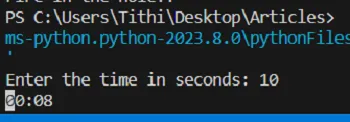
Figure 1: User input the time in seconds, and count down begins;
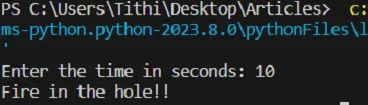
Figure 2: After the countdown ends, the message is printed
Conclusion
Hence, we have successfully constructed a Python program for an automatic countdown timer. This program allows you to set a timer for any event or work and see how much time is left on the screen.