



Introduction of the Project
Do you like to watch movies? Feel boring to find one as per your need? Today, we will solve your issue using a code to find a movie as per your interest and emotion. Sounds really amazing and exciting! Isn’t it? Then, what are you waiting for? Let’s give it a shot and see how it works. Here is a code to create a Movie Recommendation Generator in Python using Beautiful Soup Module.
- We import the modules such as BeautifulSoup, re, and requests
- Write a main function that contains movie recommendation URLs for the types of emotions available.
- We continue with the main function driver and
- Call the function to execute the following.
Requirements
1. Python Interpreter; you can use VSCode or any python IDE.
2. Pre-installed BeautifulSoup Module to get data from HTML & XML files.
Steps To Create Movie Recommendation Generator In Python Using Beautiful Soup Module
Step 1: Install BeautifulSoup if you haven’t it in your system.
Paste the below line of command in your command prompt and press enter.
pip install BeautifulSoup4
Step 2: Paste the below piece of code in your editor/IDE.
Source Code
# Import the modules

from bs4 import BeautifulSoup as SOUP


# Support for regular expressions (RE)

import re


# Requests is an HTTP library written in Python for human beings

import requests as HTTP


def main(emotion):


    # If-else ladder to go to an URL as per the type of emotion

    if(emotion == "Sad"):

        urlhere = 'http://www.imdb.com/search/title?genres=drama&title_type=feature&sort=moviemeter, asc'


    elif(emotion == "Disgust"):

        urlhere = 'http://www.imdb.com/search/title?genres=musical&title_type=feature&sort=moviemeter, asc'


    elif(emotion == "Anger"):

        urlhere = 'http://www.imdb.com/search/title?genres=family&title_type=feature&sort=moviemeter, asc'


    elif(emotion == "Anticipation"):

        urlhere = 'http://www.imdb.com/search/title?genres=thriller&title_type=feature&sort=moviemeter, asc'


    elif(emotion == "Fear"):

        urlhere = 'http://www.imdb.com/search/title?genres=sport&title_type=feature&sort=moviemeter, asc'


    elif(emotion == "Enjoyment"):

        urlhere = 'http://www.imdb.com/search/title?genres=thriller&title_type=feature&sort=moviemeter, asc'


    elif(emotion == "Trust"):

        urlhere = 'http://www.imdb.com/search/title?genres=western&title_type=feature&sort=moviemeter, asc'


    elif(emotion == "Surprise"):

        urlhere = 'http://www.imdb.com/search/title?genres=film_noir&title_type=feature&sort=moviemeter, asc'


    # HTTP request to get the data of the whole page

    response = HTTP.get(urlhere)

    data = response.text


    # Parsing the data using BeautifulSoup

    soup = SOUP(data, "lxml")


    # To extract movie titles from the data using regex

    title = soup.find_all("a", attrs = {"href" : re.compile(r'\/title\/tt+\d*\/')})

    return title

if __name__ == '__main__':


    print("\n**************************************************\n")

    # To take the input from the user

    emotion = input(" Enter your Emotion: ")

    e = main(emotion)

    count = 0


    print("\n**************************************************\n")

    print("Some recommended movies are : \n")

    if(emotion == "disgust" or emotion == "anger" or emotion=="surprise"):


        for i in e:


            tmp = str(i).split('>;')


            if(len(tmp) == 3):

                print(tmp[1][:-3])


            if(count > 13):

                break

            count += 1

    else:

        for i in e:

            tmp = str(i).split('>')


            if(len(tmp) == 3):

                print("* " + tmp[1][:-3])


            if(count > 11):

                break

            count+=1
Explanation Of The Code
In the beginning, we imported the BeautifulSoup module.
1. In the main function, we have given a URL to each emotion wrt to the genre of the movie.
2. Then, we used an HTTP request to get the data of the whole page.
3. Then, we parsed the data using the BeautifulSoup module.
4. Then, we extract movie titles from the data using regex.
5. After this, we take the input from the user.
6. Using the print function, we are printing the titles of the movie.
Output
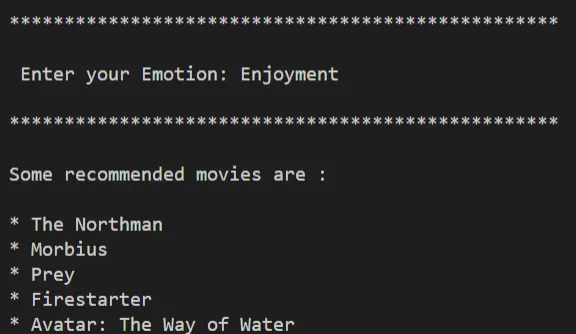
The below shows an output of our code to create a movie recommendation generator in Python using the BeautifulSoup module.
Things to Remember
- In the command prompt, when you write pip install BeautifulSoup4, the last 4 represents its version, so if you get an error while installing it, simply upgrade the version and use an integer greater than 4, and it will work!