



Introduction of the Project
In this Java tutorial, we will write the source code for a Recipe Management System In Java which creates a management system for different recipes for food items. To make this a functional system, we will use an SQL database to store information regarding Dish name, Type, Ingredients & Recipe.
Objectives
- To implement the tables that contain the recipe’s information and attach the functionality of adding & updating information to the database.
- To implement the Swing module to create a Graphic user interface involving some interactive graphics.
Requirements
- Swing module
- SQL Database
- Java Programming Concepts
Source Code
package com.company;

public class Main {

public static void main(String[] args) {

new Recipe();

}

}

package com.company;

import javax.swing.*;

import javax.swing.table.DefaultTableModel;

import java.awt.event.ActionEvent;

import java.awt.event.ActionListener;

import java.awt.event.MouseAdapter;

import java.awt.event.MouseEvent;

import java.sql.*;

import java.util.Vector;

public class Recipe {

private JTextField idData;

private JTextField nameData;

private JTextField ingriData;

private JTable table1;

private JButton ADDRECORDButton;

private JButton UPDATERECORDButton;

private JTextArea recipeData;

private JComboBox typeData;

private JPanel recipePanel;

JFrame recipe = new JFrame();

public Recipe(){

recipe.setDefaultCloseOperation(JFrame.EXIT_ON_CLOSE);

recipe.setContentPane(recipePanel);

recipe.pack();

recipe.setLocationRelativeTo(null);

recipe.setSize(600,500);

recipe.setVisible(true);

tableData();

ADDRECORDButton.addActionListener(new ActionListener() {

@Override

public void actionPerformed(ActionEvent e) {

if(idData.getText().equals("")|| nameData.getText().equals("")||recipeData.getText().equals("")|| ingriData.getText().equals("")){

JOptionPane.showMessageDialog(null,"Please Fill All Fields to add Record.");

}else{

try {

String sql = "insert into recipe"+"(ID,NAME,TYPE,INGREDIENTS,RECIPE)"+"values (?,?,?,?,?)";

Class.forName("com.mysql.cj.jdbc.Driver");

Connection connection = DriverManager.getConnection("jdbc:mysql://localhost:3306/intern","root","root");

PreparedStatement statement = connection.prepareStatement(sql);

//

statement.setInt(1,Integer.parseInt(idData.getText()));

statement.setString(2, nameData.getText());

statement.setString(3, ""+typeData.getSelectedItem());

statement.setString(4,ingriData.getText());

statement.setString(5,recipeData.getText());

statement.executeUpdate();

JOptionPane.showMessageDialog(null,"ITEM ADDED SUCCESSFULLY");

idData.setText("");

nameData.setText("");

recipeData.setText("");

ingriData.setText("");

}catch (Exception ex){

JOptionPane.showMessageDialog(null,ex.getMessage());

}

tableData();

}

}

});

UPDATERECORDButton.addActionListener(new ActionListener() {

@Override

public void actionPerformed(ActionEvent e) {

try{

String sql = "UPDATE recipe " +

"SET NAME = '"+ nameData.getText()+"',TYPE='"+ typeData.getSelectedItem()+

"',INGREDIENTS='"+ingriData.getText()+"',RECIPE='"+recipeData.getText()+"'" +

" WHERE ID="+Integer.parseInt(idData.getText());

Class.forName("com.mysql.cj.jdbc.Driver");

Connection connection = DriverManager.getConnection("jdbc:mysql://localhost:3306/intern","root","root");

PreparedStatement statement = connection.prepareStatement(sql);

statement.executeUpdate();

JOptionPane.showMessageDialog(null,"Updated successfully");

}catch (Exception e2){

System.out.println(e2);

}

tableData();

}

});

table1.addMouseListener(new MouseAdapter() {

@Override

public void mouseClicked(MouseEvent e) {

DefaultTableModel dm = (DefaultTableModel)table1.getModel();

int selectedRow = table1.getSelectedRow();

idData.setText(dm.getValueAt(selectedRow,0).toString());

nameData.setText(dm.getValueAt(selectedRow,1).toString());

recipeData.setText(dm.getValueAt(selectedRow,4).toString());

ingriData.setText(dm.getValueAt(selectedRow,3).toString());

}

});

}

public void tableData() {

try{

String a= "Select* from recipe";

Class.forName("com.mysql.cj.jdbc.Driver");

Connection connection = DriverManager.getConnection("jdbc:mysql://localhost:3306/intern","root","root");

Statement statement = connection.createStatement();

ResultSet rs = statement.executeQuery(a);

// table1.setModel(new DefaultTableModel(null, new String[]{"ID", "ITEM NAME", "QUANTITY", "PRICE"}));

table1.setModel(buildTableModel(rs));

}catch (Exception ex1){

JOptionPane.showMessageDialog(null,ex1.getMessage());

}

}

public static DefaultTableModel buildTableModel(ResultSet rs)

throws SQLException {

ResultSetMetaData metaData = rs.getMetaData();

// names of columns

Vector<String> columnNames = new Vector<String>();

int columnCount = metaData.getColumnCount();

for (int column = 1; column <= columnCount; column++) {

columnNames.add(metaData.getColumnName(column));

}

// data of the table

Vector<Vector<Object>> data = new Vector<Vector<Object>>();

while (rs.next()) {

Vector<Object> vector = new Vector<Object>();

for (int columnIndex = 1; columnIndex <= columnCount; columnIndex++) {

vector.add(rs.getObject(columnIndex));

}

data.add(vector);

}

return new DefaultTableModel(data, columnNames);

}

}
Explanation of the Code
To better understand the working of this source code, we have divided the program into two sections:
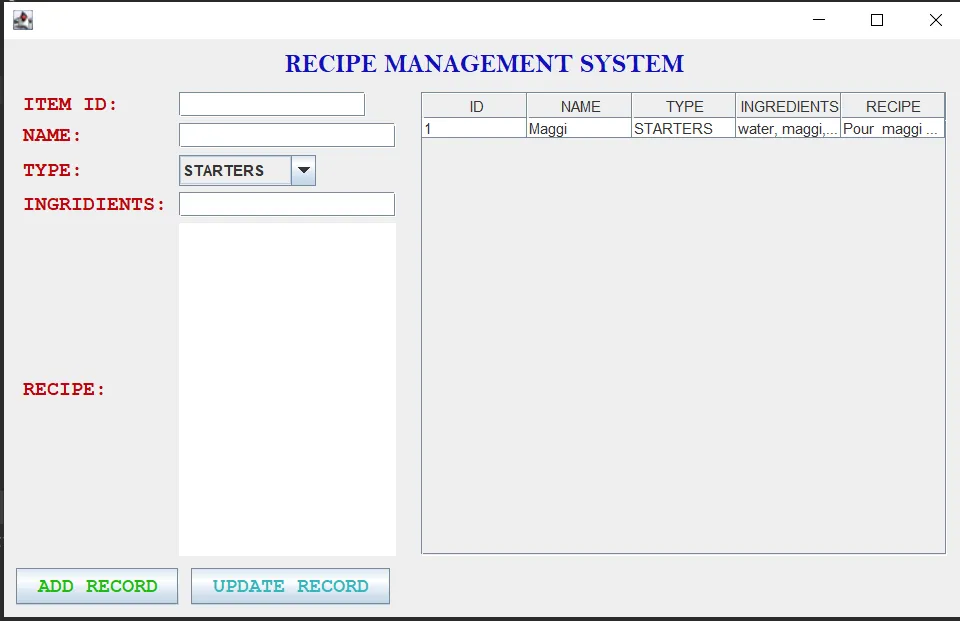
Let us look at the GUI first:
1. It consists of 4 textfields and a comboBox that require recipe-related data to be added to the database.
2. Then, we add an “ADD” button, which inserts data into the database from the textfields.
3. It consists of an Update Button that, as the name suggests, updates the database.
Moving to the retrieval, we will apply the following:
1. Build a connection first with the database using the Connection object.
2. Inject the query that stores table data in ResultSet.
3. Finally, send data to Jtable().
4. Addition & Updating the data require the injection of a query that manipulates the data & finally, using the method tableData() to display data into Jtable().
Output
Main Interface
Conclusion
This tutorial was to create a project Recipe Management System In Java that helps to manage recipes of various dishes with the Swing module used for the user interface. This is a very efficient code to create a system that stores & gets access to the recipes, so a person can easily use this application to make delicious food!