



Introduction of the Project
Looking to beat the heat and cool down your space with a nifty DIY project? You can build an automatic fan with Arduino that automatically turns on when it detects a human presence in the room.
To build this project, we will use PIR Sensors to know the existence of any human in the room on the basis of which will turn the ON or OFF the fan. This will help to save electricity as well along with the comfort it will provide and will also save human time to switch on and off the fan.
With a little bit of coding and some basic hardware, you can create a fully automated fan that will keep your space cool and comfortable all summer long. So why wait? Get started on your Arduino automatic fan project today and beat the heat in style!
Supplies
In order to make an Automatic Fan with Arduino, we will require the following components:
Components
- Arduino Uno R3
- 1 Fan
- 1 DC motor
- 1 PIR sensor
- Connecting wires
Circuit Diagram
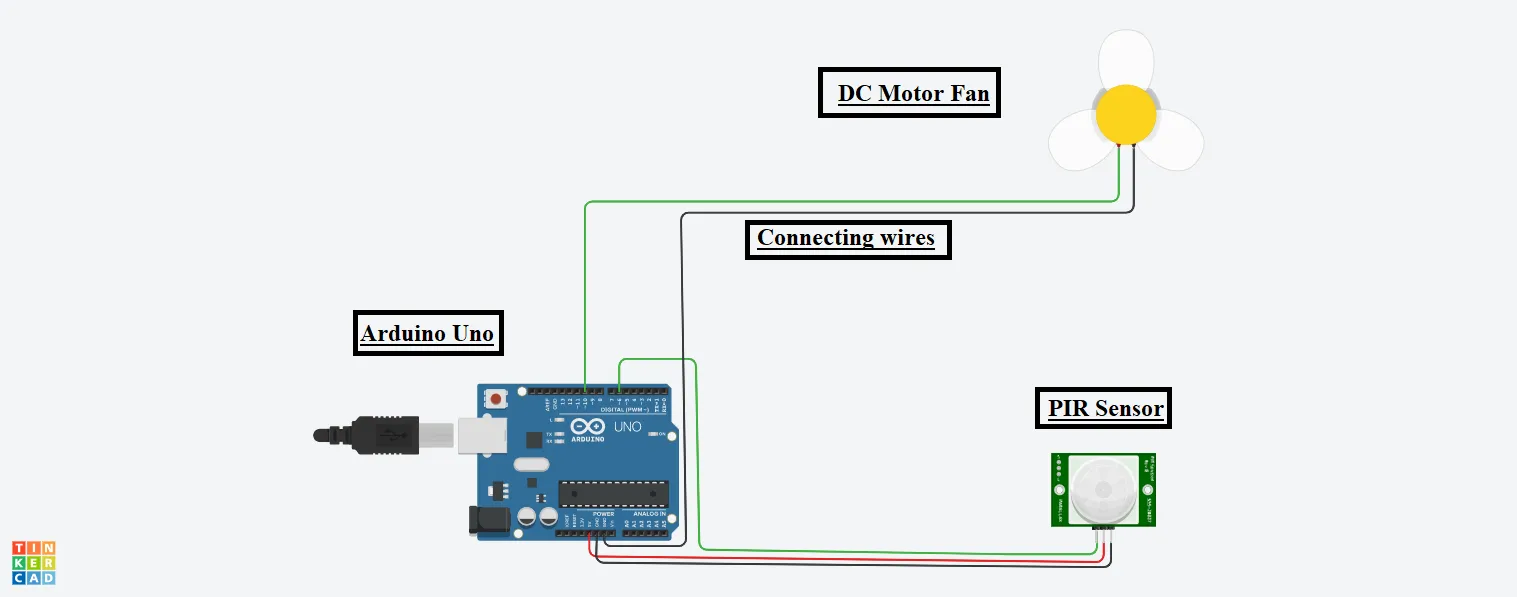
Steps To Make An Automatic Fan With Arduino
Step 1: Firstly, we have organized all the components on TinkerCad digital board.
DC Motor:
Step 2: Connect one terminal of the DC motor to the GND pin of the Arduino. And connect the fan to the DC motor.
Step 3: Connect the second terminal of the DC motor to the 10-number pin of the Arduino.
PIR Sensor:
Step 4: Connect the Power terminal of the PIR sensor to the 5V pin of the Arduino.
Step 5: Connect the Ground terminal of the PIR sensor to the GND pin of the Arduino.
Step 6: Connect the Signal terminal of the PIR sensor to the 6-number pin of the Arduino.
Source Code
int input = 0;

void setup()

{

pinMode(6, INPUT);

pinMode(10, OUTPUT);

}

void loop()

{

input = digitalRead(6);

digitalWrite(10, LOW);


if(input == HIGH)

digitalWrite(10, HIGH);

}
Explanation of the Code
1. At the beginning, we have initialized one variable to 0, in which we will be storing the input value from the sensor.
2. In the setup function, we have configured pins for input and output purposes.
3. In the loop function, we read the input from the sensor and store the value in the input variable, and then we use the if statement to rotate the fan if the input value is high.
Output
We will get the following output on the successful completion of the project.
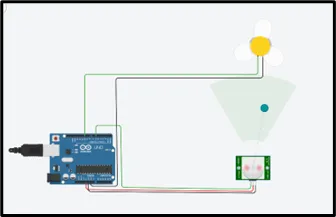
On starting the simulation, the fan will rotate if any object or human is there in the range of the sensor. If no object is in the range of the sensor fan will not rotate. In this way, electricity will be saved.