


The Covid-19 pandemic has significantly impacted global health, economies, and daily lives. Keeping track of the latest Covid-19 statistics has become crucial for individuals, healthcare professionals, and policymakers alike. In this project, we will develop a Covid-19 Tracker using Python, which will provide up-to-date information on the pandemic’s global statistics.
Introduction
The Covid-19 Tracker will utilize the power of Python programming language and APIs (Application Programming Interfaces) to fetch real-time data from reliable sources. We will make use of the requests library in Python to make API calls and retrieve the necessary information. The project will focus on displaying key statistics such as the total cases, deaths, recoveries, and other relevant information, helping users stay informed about the current situation.
Objective
The objective of the Covid-19 Tracker using Python is to provide accurate and up-to-date information about the COVID-19 pandemic. It aims to help users track the spread of the virus, understand the impact on different regions, and make informed decisions regarding safety measures, health resources, and prevention strategies.
Requirements
1. You must have a basic understanding of Python.
2. Any text editor or Visual Studio Code
3. To run and build the Python code on your machine, you will need a Python Environment.
4. disease.sh API to fetch real-time data.
Source Code
//importing required libraries

import tkinter as tk

import requests

import datetime

//creating a function called getCovidData() which includes HHTP link

def getCovidData():

api = "https://disease.sh/v3/covid-19/all" //API of disease.sh

json_data = requests.get(api).json() //requesting to get the above API data through JSON file

total_cases = str(json_data['cases']) //assigning total cases as mentioned in the api

total_deaths = str(json_data['deaths']) // assigning total deaths as mentioned in the api

today_cases = str(json_data['todayCases']) // assigning today cases as mentioned in the api

today_deaths = str(json_data['todayDeaths']) // assigning total deaths as mentioned in the api

today_recovered = str(json_data['todayRecovered']) // assigning today recovered as mentioned in the api

updated_at = json_data['updated'] //used to update the given details using time

date = datetime.datetime.fromtimestamp(updated_at/1e3)

// retrieving the details from API and displaying the results in Tkinter

label.config(text = "Total Cases: "+total_cases+

"\n"+"Total Deaths: "+total_deaths+

"\n"+"Today Cases: "+today_cases+

"\n"+"Today Deaths: "+today_deaths+

"\n"+"Today Recovered: "+today_recovered)

// current date is displayed after displaying the required information

label2.config(text = date)

//declaring tkinter size format in the output

windows = tk.Tk()

windows.geometry("400x400")

windows.title("Corona Tracker App")

f = ("poppins", 15, "bold") //alignment of text

//creating a Button to Load the information and to display once again

button = tk.Button(windows, font = f, text = "Load", command = getCovidData)

button.pack(pady = 20)

label = tk.Label(windows, font = f)

label.pack(pady=20)

label2 = tk.Label(windows, font = 8)

label2.pack()

//function to display the result

getCovidData()

//function to display tkinter window

windows.mainloop()
Explanation of the Code
1. The Covid-19 Tracker Using Python involves the Tkinter library to create a GUI application.
2. We created this application to track COVID-19 statistics. We retrieved data including total cases, total deaths, today’s cases, today’s deaths, and today’s recoveries.
3. We displayed the data in a label widget on the GUI. We have set a specific size and titled it “Corona Tracker App“. It consists of a “Load” button, a label to display the COVID-19 data, and another label to show the timestamp of the last update.
4. We defined the `getCovidData()` function to execute when clicking the “Load” button. We have made an API request to retrieve the JSON data inside the function.
5. The relevant data fields are extracted from the JSON response. The label widget is updated with the retrieved data. And the timestamp is converted from milliseconds to a human-readable date format.
6. The second label widget is updated with the timestamp. The `getCovidData()` function is called once initially to display the data.
Output
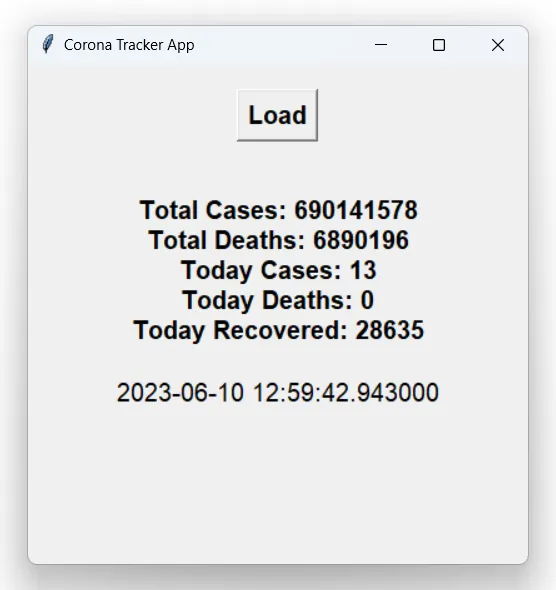
Figure 1: Covid-19 details extracted using disease.sh API
Conclusion
Hence, we successfully created a Covid 19 Tracker using Python. Retrieving data from a reliable API source enables users to access and monitor real-time COVID-19 statistics. This simple graphical interface facilitates tracking cases, deaths, and recoveries and provides a timestamp for the last update. Such tools are vital in keeping people informed and empowering them to make informed decisions in the face of the ongoing pandemic.