



Introduction of the project
Today we will make a coding project on House Price Prediction Using Python. This machine learning model helps us to predict the price of a house on the basis of features like BHK, area, locality, etc. This model acts as a helping hand to the people engaged in the real estate industry. We have created this model through the dataset of Bangalore city, where the model predicts the price of a property on the basis of various features of the house in Bangalore.
Objectives
- The objective of building this machine learning model is to help clients in the real estate industry. This will help the people looking for a place to live to select the best property for living based on their own specifications and utility.
- To give the estimated price of a house according to the features so that users can get the best-fit property for their living purpose with their needs of the area, locality and rates accordingly.
- To act as an interface between the real estate industry and specific clients associated with it.
Requirements
1. Python Libraries
- Pandas
- NumPy
- Matplotlib
2. Jupyter Notebook or Google Colab
3. Dataset
Source Code
import pandas as pd

import numpy as np

from matplotlib import pyplot as plt

import matplotlib

%matplotlib inline

matplotlib.rcParams["figure.figsize"] = (20,10) # this is used to customize matplotlib at run time

# All the figures and plots will be 20 inches in width and 10 inches in height

df= pd.read_csv('Bengaluru_House_Data.csv')

df

df.shape

df['area_type'].value_counts() # This will keep a count on total how many areas are presen

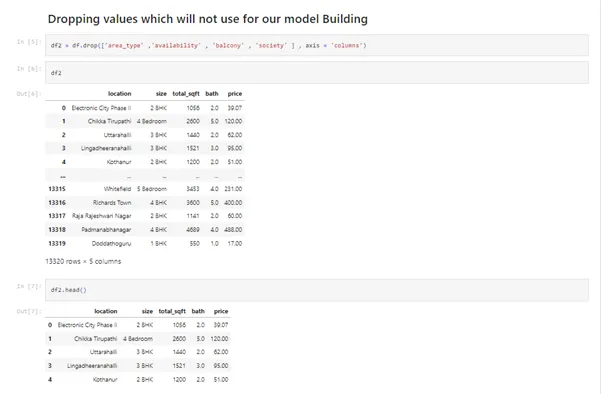
df2 = df.drop(['area_type' ,'availability' , 'balcony' , 'society' ] , axis = 'columns')

df2

df2.head()

df2.isnull() # checking if any missing value is present or not

df2.isnull().sum() # This shows the NA values

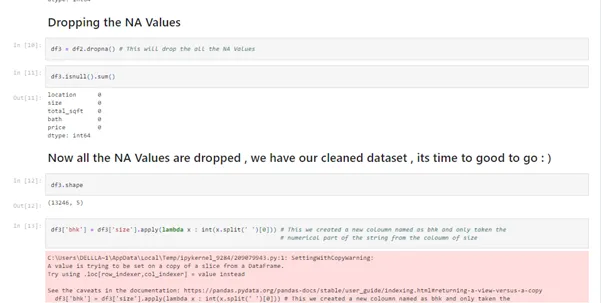
df3 = df2.dropna() # This will drop the all the NA Values

df3.isnull().sum()

df3.shape

df3['bhk'] = df3['size'].apply(lambda x : int(x.split(' ')[0])) # This we created a new coloumn named as bhk and only taken the

# numerical part of the str

df3.head()

df3['bhk'].unique()

df3[df3.bhk>20]

# exploring total_sqft

df3['total_sqft'].unique()

df3['location'].value_counts

def is_float(x):

try:

float(x)

except:

return False

return True

df3[~df3['total_sqft'].apply(is_float)]

def convert_sqft_to_num(x):

tokens = x.split('-')

if len(tokens) == 2:

return (float(tokens[0])+float(tokens[1]))/2

try:

return float(x)

except:

return None

df4 = df3.copy() # creating a new data frame

df4['total_sqft'] = df4['total_sqft'].apply(convert_sqft_to_num) # applying the function within our coloumn of our new data frame

df4.head()

df4.loc[30]

df4.head()

df5 = df4.copy()

# now its time to create a coloumn of price per square feet as its important for real estate

df5['price_per_sqft'] = df5['price']*100000/df5['total_sqft']

df5.head()

df5.location.unique()

len(df5.location.unique())

df5.location = df5.location.apply(lambda x : x.strip()) # this is to remove the irregularities in location text data

# checking the number of data rows of different locations

location_stats = df5.groupby('location')['location'].agg('count')

location_stats

# sorting in descending order

location_stats = df5.groupby('location')['location'].agg('count').sort_values(ascending = False)

location_stats

len(location_stats[location_stats<=10]) # checking the number of locations with less than or equal to 10 data points

location_stats_less_than_ten = location_stats[location_stats<=10]

location_stats_less_than_ten

df5.location = df5.location.apply(lambda x : 'other' if x in location_stats_less_than_ten else x)

len(df5.location.unique())

df5.head(10)

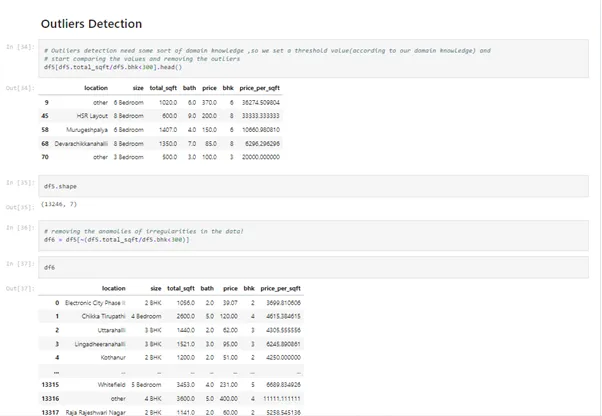
# Outliers detection need some sort of domain knowledge ,so we set a threshold value(according to our domain knowledge) and

# start comparing the values and removing the outliers

df5[df5.total_sqft/df5.bhk<300].head()

df5.shape

# removing the anamolies of irregularities in the data!

df6 = df5[~(df5.total_sqft/df5.bhk<300)]

df6

df5.shape

df6.shape

df6.price_per_sqft.describe()

# setting a threshold and considering only that values which will greater than (m-st) and smaller than (m+st)

def remove_pps_outliers(df):

df_out = pd.DataFrame()

for key, subdf in df.groupby('location'):

m = np.mean(subdf.price_per_sqft)

st = np.std(subdf.price_per_sqft)

reduced_df = subdf[(subdf.price_per_sqft>(m-st)) & (subdf.price_per_sqft<=(m+st))]

df_out = pd.concat([df_out,reduced_df],ignore_index=True)

return df_out

df7 = remove_pps_outliers(df6)

df7.shape

df7

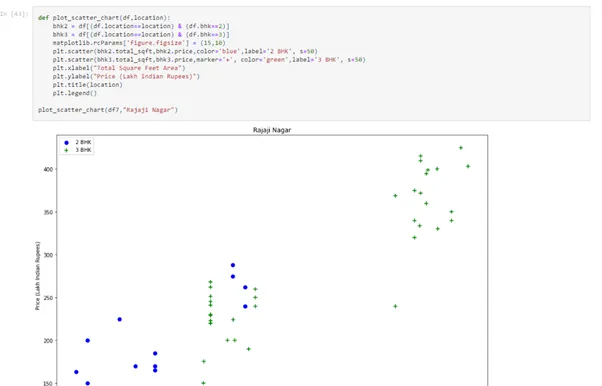
def plot_scatter_chart(df,location):

bhk2 = df[(df.location==location) & (df.bhk==2)]

bhk3 = df[(df.location==location) & (df.bhk==3)]

matplotlib.rcParams['figure.figsize'] = (15,10)

plt.scatter(bhk2.total_sqft,bhk2.price,color='blue',label='2 BHK', s=50)

plt.scatter(bhk3.total_sqft,bhk3.price,marker='+', color='green',label='3 BHK', s=50)

plt.xlabel("Total Square Feet Area")

plt.ylabel("Price (Lakh Indian Rupees)")

plt.title(location)

plt.legend()


plot_scatter_chart(df7,"Rajaji Nagar")

df7.head(5)

# now removing the outliers

def remove_bhk_outliers(df):

exclude_indices = np.array([])

for location, location_df in df.groupby('location'):

bhk_stats = {}

for bhk, bhk_df in location_df.groupby('bhk'):

bhk_stats[bhk] = {

'mean': np.mean(bhk_df.price_per_sqft),

'std': np.std(bhk_df.price_per_sqft),

'count': bhk_df.shape[0]

}

for bhk, bhk_df in location_df.groupby('bhk'):

stats = bhk_stats.get(bhk-1)

if stats and stats['count']>5:

exclude_indices = np.append(exclude_indices, bhk_df[bhk_df.price_per_sqft<(stats['mean'])].index.values)

return df.drop(exclude_indices,axis='index')

df8 = remove_bhk_outliers(df7)

# df8 = df7.copy()

df8.shape

plot_scatter_chart(df8 , 'Rajaji Nagar') # plotting the difference after removing the outlier

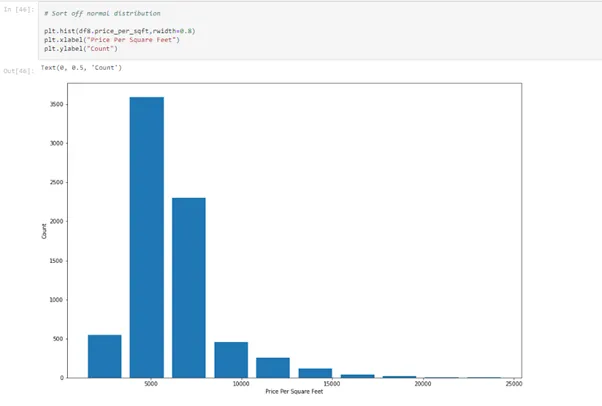
# Sort off normal distribution

plt.hist(df8.price_per_sqft,rwidth=0.8)

plt.xlabel("Price Per Square Feet")

plt.ylabel("Count")

df8.bath.unique()

df8[df8.bath>10]

plt.hist(df8.bath , rwidth = 0.8)

plt.xlabel("Number Of Bathrooms")

plt.ylabel("Counts")

df8[df8.bath>df8.bhk+2]

df9 = df8[df8.bath<df8.bhk+2]

df9.shape # we have only considered the data in which bathrooms are less than the bhk and setted in a new data frame

# Now dropping all the necessary coloumns for training and testing process

df10 = df9.drop(['size' , 'price_per_sqft'] , axis = 'columns')

df10.head(5)

dummies = pd.get_dummies(df10.location) # as location is the text data so we need to convert it into numerical so that our model

# could handle the data

dummies.head(3)

# this is one hot encoding

df11 = pd.concat([df10 , dummies.drop('other' , axis = 'columns') ] , axis = 'columns')

df11.head(5)

df12 = df11.drop('location' , axis = 'columns')

df12

df12.shape

X = df12.drop('price' , axis = 'columns')

X.head()

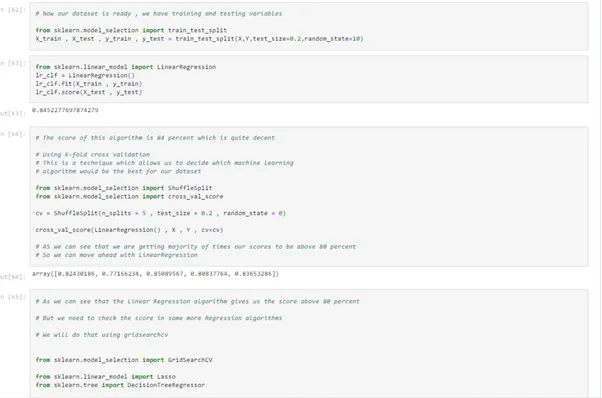
# Now our dataset is ready , we have training and testing variables

from sklearn.model_selection import train_test_split

X_train , X_test , y_train , y_test = train_test_split(X,Y,test_size=0.2,random_state=10)

from sklearn.linear_model import LinearRegression

lr_clf = LinearRegression()

lr_clf.fit(X_train , y_train)

lr_clf.score(X_test , y_test)

# The score of this algorithm is 84 percent which is quite decent

# Using K-fold cross validation

# This is a technique which allows us to decide which machine learning

# algorithm would be the best for our dataset

from sklearn.model_selection import ShuffleSplit

from sklearn.model_selection import cross_val_score

cv = ShuffleSplit(n_splits = 5 , test_size = 0.2 , random_state = 0)

cross_val_score(LinearRegression() , X , Y , cv=cv)

# AS we can see that we are getting majority of times our scores to be above 80 percent

# So we can move ahead with LinearRegression

# As we can see that the Linear Regression algorithm gives us the score above 80 percent

# But we need to check the score in some more Regression algorithms

# We will do that using gridsearchcv

from sklearn.model_selection import GridSearchCV

from sklearn.linear_model import Lasso

from sklearn.tree import DecisionTreeRegressor

def find_best_model_using_gridsearchcv(X,y):

algos = {

'linear_regression' : {

'model': LinearRegression(),

'params': {

'normalize': [True, False]

}

},

'lasso': {

'model': Lasso(),

'params': {

'alpha': [1,2],

'selection': ['random', 'cyclic']

}

},

'decision_tree': {

'model': DecisionTreeRegressor(),

'params': {

'criterion' : ['mse','friedman_mse'],

'splitter': ['best','random']

}

}

}

scores = []

cv = ShuffleSplit(n_splits=5, test_size=0.2, random_state=0)

for algo_name, config in algos.items():

gs = GridSearchCV(config['model'], config['params'], cv=cv, return_train_score=False)

gs.fit(X,y)

scores.append({

'model': algo_name,

'best_score': gs.best_score_,

'best_params': gs.best_params_

})

return pd.DataFrame(scores,columns=['model','best_score','best_params'])

find_best_model_using_gridsearchcv(X,Y)

X.columns

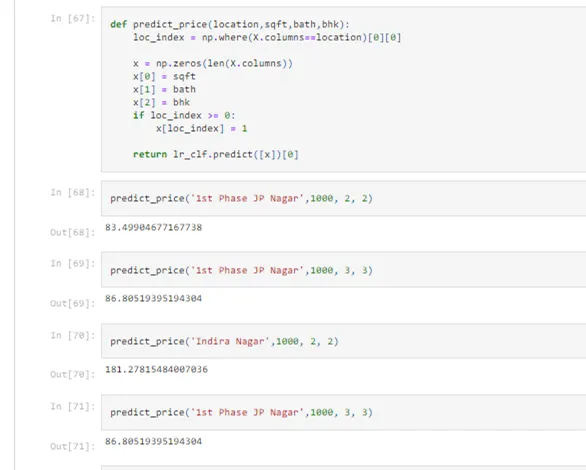
def predict_price(location,sqft,bath,bhk):

loc_index = np.where(X.columns==location)[0][0]

x = np.zeros(len(X.columns))

x[0] = sqft

x[1] = bath

x[2] = bhk

if loc_index >= 0:

x[loc_index] = 1

return lr_clf.predict([x])[0]

predict_price('1st Phase JP Nagar',1000, 2, 2)
Explanation of the Code
1. Initially, we imported all the necessary libraries that will be required for this prediction model and loaded our dataset for analysis.
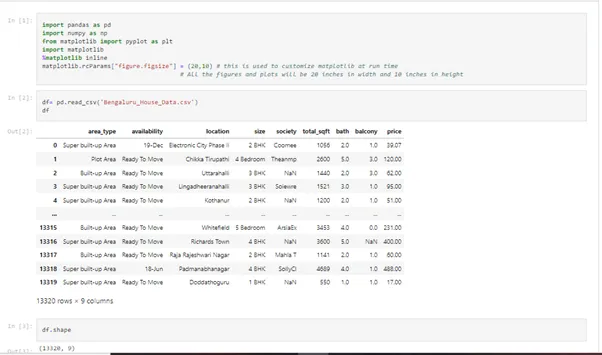
2. After importing the necessary python libraries, we perform a cleaning of the dataset.
3. Checking the null values and accordingly dropping them to clean the dataset further.
4. Once the dataset has been cleaned, then we start detecting the outliers.
5. Now, we have used the matplotlib library to visualize our dataset.
6. Next is the Train Test Split phase and using the K-fold cross-validation to select the best algorithms.
Output
Finally, the house price prediction using python model is ready with a predict function which will predict the price of a house on the basis of given parameters passed in the predict function accordingly.
Conclusion
This machine learning model of House Price Prediction Using Python helps the clients to select the best property according to their own utility and demand as this model predicts the price of the house on the basis of features like BHK, area in square feet, locality, etc. This coding project can serve as a helping hand in the real estate industry and can make the process of buying a house in a specific area accessible.